App Settings
Duplicate Contacts
By default, Reach requires each contact to have a unique name. If you try to save a contact with a name that already exists, you will receive a validation error stating that the name must be unique. However, you can choose to allow duplicate contacts to be created and edited by bypassing this validation:
- In the sidebar, click on Settings
- Click General
- Locate the Duplicate contacts section.
- Check the box labeled Allow duplicate contacts when creating / editing contacts.
caution
This may have implications if you are syncing contacts to a device.
Table Style
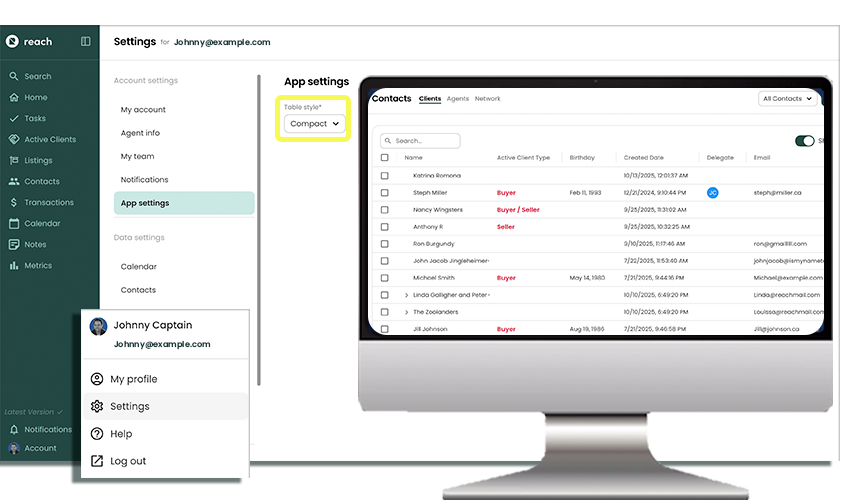
Reach displays lots of your data in table format, such as Listings, Active Clients and Contacts. You can opt to have a “Compact” or “Normal” table view, which controls to visual display (and white space padding around each data point). To edit your table size:
- In the sidebar, click on Settings
- Click General
- Select your Table Style
- Normal View (Table buffer is expanded, giving more white space between items)
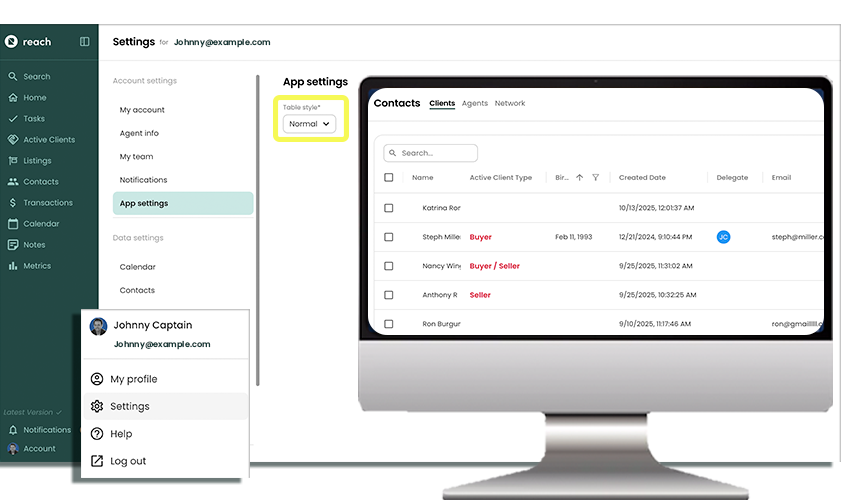
- Compact View (fits more in the screen, condensed view of information)